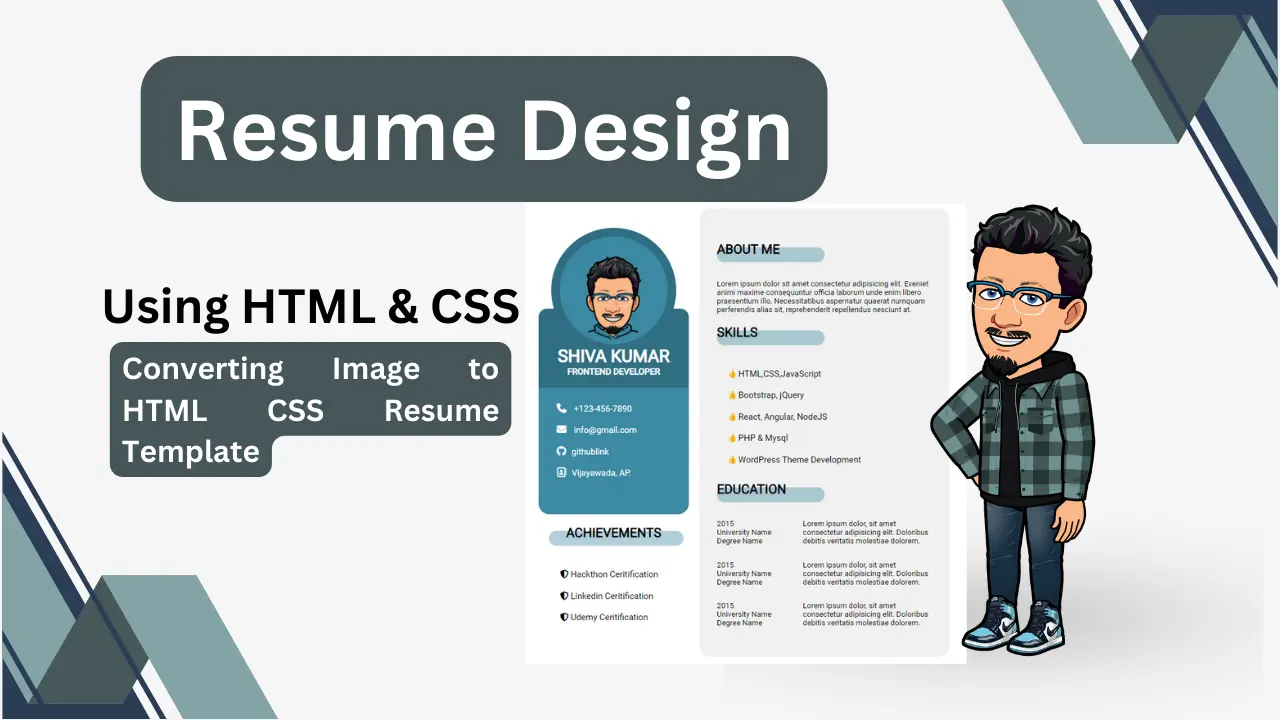

Building a professional resume doesn’t always require complex tools like Adobe illustrator or Figma to showcase your skills in an Interview. Here, with the power of simple HTML and CSS, you can design a clean and modern resume right on your PC with fully customizable, responsive and easy to upload to GitHub and share your Resume on LinkedIn or for an Interview.
Your resume is often the first impression you make — so why not make it stand out with a clean design and modern styling? In this blog article tutorial, we’ll walk through the structure and style of a simple resume-building webpage built with pure HTML and CSS.
Resume Building Project Overview
- The goal of this project is to design a digital resume that:
- Looks professional and well-structured
- Uses simple HTML and CSS — no frameworks required
- Highlights personal information, contact details, education, and skills clearly
- It is easily customizable and reusable for different profiles
Here’s what the final layout includes in this custom resume-building project:
- Adding Profile image and name section
- Showing Contact information with icons
- Adding your Achievements list
- A brief About Me section
- Adding Professional Skills section
- Adding overall Education history
The entire design is built within a single .html file. Let’s explore how it’s organised.
Code: HTML & CSS
<!DOCTYPE html>
<html lang="en">

<head>
    <meta charset="UTF-8">
    <meta name="viewport" content="width=device-width, initial-scale=1.0">
    <title>Resume Building</title>
    <link rel="stylesheet" href="./css/all.min.css">
    <link href="https://fonts.googleapis.com/css2?family=Roboto" rel="stylesheet">

    <style>
         :root {
            --blue-light: #396CB6;
            --light-clay: #3C8AA3;
            --dark-clay: #306E82;
            --light-dark: #272B2B;
        }

        .container {
            padding: 40px 80px;
            height: 100vh;
            display: flex;
            justify-content: center;
            align-items: center;
            font-family: 'Roboto', sans-serif;
            margin: 40px 0;
        }

        .set1 {
            padding: 20px;
        }

        .set2 {
            width: 400px;
            background-color: #f1f1f1;
            border-radius: 20px;
            padding: 42px 32px;
            z-index: -2;
        }

        .set1 {
            text-align: center;
        }

        img {
            width: 200px;
            border-radius: 50%;
            background-color: var(--light-clay);
            border: 16px solid var(--dark-clay);
        }

        .std-name {
            background-color: var(--dark-clay);
            color: #fff;
            padding: 68px 36px 40px;
            border-radius: 16px;
            margin-top: -86px;
        }

        .std-name h2 {
            font-size: 20px;
        }

        h4 {
            font-size: 12x;
            font-weight: 300;
        }

        h1,
        h4 {
            padding: 0;
            margin: 0;
        }

        .contact {
            background-color: var(--light-clay);
            border-radius: 0 0 20px 20px;
            margin-top: -20px;
            padding-bottom: 20px;
        }

        ul {
            list-style-type: none;
            text-align: left;
        }

        .contact ul {
            padding: 20px;
            margin-top: 0;
        }

        .contact ul li {
            line-height: 2.5;
            color: #fff;
            padding: 0 14px;
        }

        .contact ul li i {
            padding-right: 10px;
            font-size: 18px;
            color: #fff
        }

        h1,
        h4,
        .title {
            text-transform: uppercase;
            font-weight: 600;
        }

        .set1 .title::after {
            content: "";
            border-radius: 20px;
            background-color: var(--light-clay);
            height: 28px;
            position: relative;
            left: 20px;
            z-index: -1;
            top: -18px;
            width: 250px;
            display: block;
            opacity: 0.4;
        }

        h2.title {
            margin-bottom: 0;
        }

        .reference ul li {
            line-height: 2.5;
        }

        .set2 .title::after {
            content: "";
            border-radius: 20px;
            background-color: var(--light-clay);
            height: 28px;
            position: relative;
            z-index: -1;
            top: -18px;
            width: 200px;
            display: block;
            opacity: 0.4;
        }

        .skills ul {
            list-style-type: "\1F44D";
        }

        .skills ul li {
            line-height: 2.5;
        }

        .edu-details {
            display: flex;
        }

        .edu-year {
            width: 40%;
        }

        .edu-des {
            width: 60%;
        }

        p {
            font-size: 14px;
        }
    </style>
</head>

<body>
    <div class="container">

<!-- Left Section, contains the photo, name, contact info, and achievements -->
        <div class="set1">
            <img src="./pic-00.png" alt="">
            <div class="std-name">
                <h1>Shiva Kumar</h1>
                <h4>frontend developer</h4>
            </div>
            <div class="contact">
                <ul>
                    <li><i class="fa-solid fa-phone"></i> +123-456-7890</li>
                    <li><i class="fa-solid fa-envelope"></i> info@gmail.com</li>
                    <li><i class="fa-brands fa-github"></i>githublink</li>
                    <li><i class="fa-regular fa-address-book"></i>Vijayawada, AP.</li>
                </ul>
            </div>
            <div class="reference">
                <h2 class="title">Achievements</h2>
                <ul>
                    <li><i class="fa-solid fa-shield-halved"></i> Hackthon Ceritification</li>
                    <li><i class="fa-solid fa-shield-halved"></i> Linkedin Ceritification</li>
                    <li><i class="fa-solid fa-shield-halved"></i> Udemy Ceritification</li>
                </ul>
            </div>
        </div>

<!-- Right Section, contains the “About Me”, “Skills”, and “Education” sections -->
        <div class="set2">
            <div class="about-me">
                <h2 class="title">about me</h2>
                <p>Lorem ipsum dolor sit amet consectetur adipisicing elit. Eveniet animi maxime consequuntur officia laborum unde enim libero praesentium illo. Necessitatibus aspernatur quaerat numquam perferendis alias sit, reprehenderit repellendus nesciunt
                    at.
                </p>
            </div>
            <div class="skills">
                <h2 class="title">Skills</h2>
                <ul>
                    <li>HTML,CSS,JavaScript</li>
                    <li>Bootstrap, jQuery</li>
                    <li>React, Angular, NodeJS</li>
                    <li>PHP & Mysql</li>
                    <li>WordPress Theme Development</li>
                </ul>
            </div>
            <div class="Education">
                <h2 class="title">education</h2>
                <div class="edu-set">
                    <div class="edu-details">
                        <p class="edu-year">2015<br>University Name<br>Degree Name</p>
                        <p class="edu-des">Lorem ipsum dolor, sit amet consectetur adipisicing elit. Doloribus debitis veritatis molestiae dolorem.</p>
                    </div>
                    <div class="edu-details">
                        <p class="edu-year">2015<br>University Name<br>Degree Name</p>
                        <p class="edu-des">Lorem ipsum dolor, sit amet consectetur adipisicing elit. Doloribus debitis veritatis molestiae dolorem.</p>
                    </div>
                    <div class="edu-details">
                        <p class="edu-year">2015<br>University Name<br>Degree Name</p>
                        <p class="edu-des">Lorem ipsum dolor, sit amet consectetur adipisicing elit. Doloribus debitis veritatis molestiae dolorem.</p>
                    </div>
                </div>
            </div>
        </div>
    </div>
    <!-- HTMLCSSJavaScriptjQueryBootstrapArduinoReactAngularFull Stack Web Developmentweb development in teluguWeb Development BootcampFull Stack Web Development in TeluguArduino ProjectsArduino for BeginnersElectronic ProjectsPHP and MySQLcrash coursesMastering Full Stack Web Development in TeluguTelugu Web Development Tutorialcomplete web development in teluguTelugu Full Stack Development Crash CourseNode JSDynamic Web DevelopmentFree courses -->

</body>

</html>
Key Takeaways of this mini-Project
- HTML structure defines the content and logical sections.
- CSS flexbox ensures alignment and spacing across devices.
- Custom colour variables make it easy to choose your preference.
- Icons and bullets add a professional touch.
This resume design is simple yet highly customizable — you can change colours, fonts, or layout proportions to match your style or branding.
Finally Building your resume using HTML and CSS not only showcases your technical skills but also gives you full control over its design and content. You can even host it online as a personal portfolio page in GitHub or with buying a domain to make it publicly accessible, which is perfect for sharing!
If you’re learning web development, this is a great mini-project to strengthen your HTML structure, CSS layout, and styling skills.
New designs and help learning web development coding – comment below.